Flight Booking & Ticketing Software for Travel Agencies and OTAs
Bring flight search, reservations and ticketing into one connected workflow. IV Trip helps travel agencies manage customer bookings, agent pricing and post-booking requests through a centralized platform. Build your B2B agent portal, customer-facing booking website or complete online travel agency with the integrations your business needs.
● For travel agencies, tour operators, B2B distributors and online travel agencies.
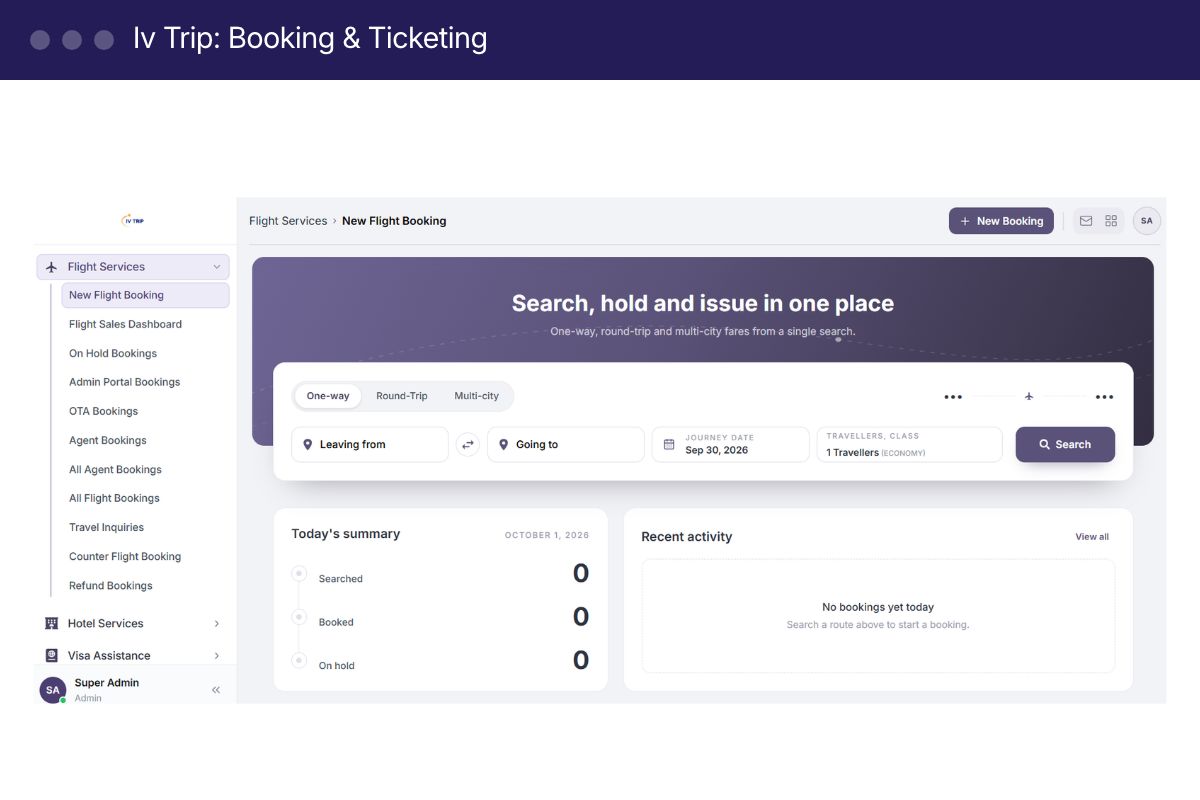
What is IV Trip Flight Booking & Ticketing Software?
IV Trip Flight Booking & Ticketing Software is a travel technology solution for searching flights, creating reservations, managing Passenger Name Records (PNRs) and issuing electronic tickets through connected airline or distribution systems. It brings booking records, customer details, agent markups and ticketing workflows into one platform.
At a glance
- Category
- Flight & Ticketing
- Best for
- Small, mid, large-sized businesses
- Platform
- Web, iOS, Android
- Booking models
- B2B agent booking and B2C customer booking
- Integration scope
- Selected GDS, airline and third-party APIs
From Flight Search to E-Ticket, One Connected Workflow
Find the Right Flight for Every Customer
Search flight options through connected suppliers and compare available fares, schedules and journey details. Help customers choose flights that fit their route, budget and travel preferences.
- Search one-way, return and multi-city journeys.
- Review available cabin classes and fare options.
- Check baggage information and fare conditions supplied by the provider.
- View flight details before creating a reservation.
Manage Reservations, PNRs and Ticketing
Keep passenger information, booking references and ticket details together. Give your team a clear view of each reservation as it moves through the booking and ticketing process.
- Create and retrieve PNR records.
- Manage passenger and itinerary details.
- Track held bookings and ticketing deadlines where supported.
- Issue and retrieve e-tickets through approved connections.
- Handle cancellation, refund and reissue workflows where supported.
Control Agent Pricing and Booking Performance
Manage how your agency sells flights across customer and agent channels. Apply agreed pricing rules and monitor booking activity from a centralized dashboard.
- Configure markups for your sales channels.
- Manage agent and subagent access.
- Review booking and ticketing activity.
- Monitor sales through operational reports.
- Connect booking records with customer and billing workflows.
Why Travel Teams Choose IV Trip?
B2B and B2C booking
Serve travel agents and direct customers through the booking channels included in your deployment.
Centralized booking records
Keep passenger details, PNRs and ticket information accessible to authorized team members.
Flexible supplier connections
Build your platform around selected GDS, airline and travel-service APIs.
Agent pricing control
Manage markups and selling prices for different distribution channels.
Post-booking workflows
Organize cancellation, refund and reissue requests alongside the original reservation.
Customer management
Link booking activity with customer records and follow-up processes.
Business visibility
Review booking activity and sales reports to support everyday decisions.
Modular deployment
Start with flight booking and add other travel modules as your requirements grow.
Launch Your Flight Booking Platform in 4 Steps
- Define Your Booking Model
Choose a B2B agent portal, B2C booking website or combined platform. Identify your users, sales channels and operational requirements.
- Confirm Supplier Access
Select the GDS or airline connections you need. Confirm API credentials, commercial agreements and ticketing permissions.
- Configure Your Workflows
Set up branding, user access, markups, booking rules and the customer or billing modules included in your project.
- Test and Launch
Validate flight search, reservations, ticket issuance and supported post-booking actions before going live. Train your team on daily operations.
Connect Flight Booking with Your Travel Business
Choose the connections and modules that fit your operations.
IV Trip vs. Manual Flight Booking Workflows
| Feature | IV Trip | Disconnected tools |
|---|---|---|
| Flight search | Search through connected suppliers | Check supplier systems separately |
| Reservation records | Centralized booking and PNR records | Records spread across portals and files |
| Agent pricing | Configured markup rules | Manual calculations |
| Ticket tracking | Booking and ticket details in one workflow | Separate logs and follow-ups |
| Customer history | Linked records within the selected scope | Separate contact lists and spreadsheets |
| Reporting | Consolidated operational views | Manually compiled reports |
What customers say
“We replaced four separate tools with iquidi. Our sales and accounts teams finally see the same numbers.”
“Inventory used to be a spreadsheet nightmare. Now reorders happen automatically across all three warehouses.”
“Setup took an afternoon. The pricing is a fraction of what we paid for our old CRM alone.”
Flight Booking & Ticketing Software for Travel Agencies and OTAs
Flight booking is central to a travel agency’s daily operations. Customers expect clear flight options, accurate fares and timely ticket confirmation. Meanwhile, agents must manage passenger details, reservation deadlines, supplier systems and post-booking requests. As bookings grow, handling these tasks across separate portals and spreadsheets becomes harder.
Flight booking and ticketing software brings these activities into a connected workflow. IV Trip by ImpleVista helps travel businesses organize flight reservations, customer records and ticketing operations through a platform configured around their requirements.
What Is Flight Booking & Ticketing Software?
Flight booking and ticketing software allows travel agencies to search available flights, create reservations, manage Passenger Name Records (PNRs) and issue electronic tickets through authorized supplier connections.
A PNR stores reservation information, including passenger names and journey details. An e-ticket confirms ticket issuance for travel. The distinction matters: a reserved flight may still require payment and ticket issuance before the supplier’s deadline.
For travel agencies and online travel agencies, a centralized system makes it easier to follow each booking from initial enquiry through ticket confirmation.
Simplify Flight Search and Reservations
Finding a suitable flight involves more than comparing prices. Travelers also consider departure times, connections, cabin classes, baggage allowances and fare conditions.
A flight booking platform can display this information from connected suppliers, helping agents review options before making a reservation. Depending on the selected integration, searches may include one-way, return and multi-city journeys.
IV Trip can be configured around the supplier connections your business requires. Search results, available fares and booking functions depend on the connected APIs and your provider agreements.
Keep PNRs and Ticketing Records Organized
Accurate passenger information is essential to successful ticketing. Names, travel dates and itinerary details need careful review before issuance.
A centralized booking workflow helps teams maintain reservation references, passenger records and ticket details together. Agents can identify which bookings require attention and track ticketing deadlines where supplier support is available.
This organized approach also helps when customers contact the agency later. Staff can retrieve the relevant booking rather than searching through messages, emails and separate files.
Support B2B Agents and B2C Customers
Travel businesses often serve different sales channels. A B2B flight booking portal gives authorized agents and subagents access to booking services. A B2C platform allows travelers to search and book through an agency’s branded website.
IV Trip can support either model or a combined deployment within the agreed scope. Markup configuration helps businesses manage selling prices across selected channels.
Connecting booking activity with customer and billing workflows can also reduce repeated data entry and improve operational visibility.
Manage Post-Booking Requests
Customer service continues after ticket issuance. Travelers may request date changes, cancellations, refunds or reissues.
Keeping these requests alongside the original reservation helps teams review booking details and communicate the next steps clearly. However, available actions depend on airline fare rules, supplier capabilities and agency permissions.
No booking platform can override airline conditions. Agencies should confirm the applicable charges and processing requirements before completing a customer’s request.
Choose Software Around Your Agency’s Needs
Before selecting flight booking software, define your booking model, expected users and required supplier connections. Confirm API access, ticketing permissions, payment requirements and reporting needs.
Implementation should include testing flight search, reservations, ticket issuance and supported post-booking workflows. Team training is equally valuable.
IV Trip offers a foundation for connecting flight booking with wider travel operations. Whether you need a B2B portal, a customer-facing booking website or a broader travel platform, the right configuration starts with understanding your business.
Flight Booking & Ticketing Software: frequently asked questions
Flight booking software helps travel businesses search flights, manage passenger details, create reservations and track bookings. When connected to an approved ticketing provider, it can also support e-ticket issuance and selected post-booking actions.
A PNR is the reservation record containing passenger and journey information. An e-ticket is the electronic ticket issued for travel. Creating a reservation does not always mean a ticket has been issued.
IV Trip can be configured for a B2B agent portal, a B2C customer booking platform or both, according to the agreed deployment scope.
The required GDS connection must be confirmed during project scoping. Availability depends on the integration supported by the deployment, your provider agreement, API credentials and ticketing permissions.
These workflows can be included where the connected supplier supports them. Available actions, charges and processing conditions depend on airline fare rules and provider permissions.
Markup configuration can be included for your customer or agent sales channels. The applicable rules are configured according to your business requirements.
You need authorized supplier access for the flight services your platform will use. Ticket issuance may require additional commercial arrangements or access through an authorized ticketing partner.
Additional travel modules can be considered as your business grows. Integration requirements, delivery scope and pricing are assessed separately.
The cost depends on your booking model, supplier integrations, customization and supporting modules. Request a quotation based on your agency’s requirements.
The timeline depends on API access, integration complexity, customization and testing. An implementation schedule is provided after confirming the project scope.
Bring Flight Search, Booking and Ticketing Together
Give your team a connected way to manage reservations and serve customers. Tell us how your agency operates, and we’ll help define the right IV Trip configuration.
Book a Demo